Open Source Coding Agent Harness: Build a Forkable, Local AI Engineering Runtime
The 2026 conversation moved from models to **harnesses** — the runtime that turns a model into an autonomous engineer. An open source coding agent harness you can read, fork, and self-host is the difference between renting an assistant and owning your engineering automation. This is how harness engineering works, why it matters, and how Smoke Monkey Harness fits the emerging meta-harness era.
Open Source Coding Agent Harness: Build a Forkable, Local AI Engineering Runtime: The 2026 conversation moved from models to **harnesses** — the runtime that turns a model into an autonomous engineer. An open source coding agent harness you can read, fork, and self-host is the difference between renting an assistant and owning your engineering automation. This is how harness engineering works, why it matters, and how Smoke Monkey Harness fits the emerging meta-harness era. Designed as a zero-dependency, open-source TypeScript architecture under the MIT License with native Model Context Protocol (MCP) support and deterministic phase state machines.
- Harness, not model, defines autonomy: planning loop, tools, context, and permissions are the harness.
- Open and forkable: MIT-licensed TypeScript with zero runtime dependencies you can audit end to end.
- Local-first: run the full harness offline with Ollama, DeepSeek, or Qwen3, or attach a frontier API.
- Composable: expose the harness over MCP so Claude Code, Cursor, and Codex can drive your tools.
import { createAgent, defineTool } from 'smoke-monkey-harness';// Extend the harness with your own tool — the runtime is plain TypeScriptconst deployTool = defineTool({name: 'deploy_preview',description: 'Deploy the current branch to a preview URL',parameters: { branch: 'string' },run: async ({ branch }) => deployPreview(branch),});const agent = createAgent({provider: 'ollama',model: 'deepseek-r1:14b',workspacePath: process.cwd(),tools: [deployTool],});await agent.run('Open a PR, deploy a preview, and report the URL');
Watch: Related Video Guides
Anthropic Just Built an Agentic OS — Open Source Harness Breakdown
Smoke Monkey
Let's build a Coding Agent Harness from Scratch (Step by Step, No frameworks)
Neural Breakdown with AVB
What Is a Coding Agent Harness?
A harness is everything around the model: the agent loop that decides what to do next, the tool layer that acts on the filesystem and shell, the context manager that keeps the conversation within budget, and the permission system that decides what is allowed. Swap the model and the harness stays constant; swap the harness and the same model becomes deterministic or chaotic. That is why two products using an identical model can feel completely different. For a deeper definition, see what is an AI agent harness.
The Meta-Harness Era: DeepSeek, Pi, and Omnigent
Late 2025 into 2026 produced a wave of harness releases — the DeepSeek harness, the Pi agent, and meta-harnesses like Omnigent that multiplex Claude Code, Codex, and others behind one interface. The lesson for anyone building their own tool is that the harness is now a first-class product, not glue code. Rather than adopting a meta-harness and hoping it covers your integration, you can embed an open, MIT-licensed runtime and grow exactly the tools and policies your product needs. Smoke Monkey Harness is built for that: it is a zero-dependency library, not a hosted service.
Anatomy of the Smoke Monkey Harness
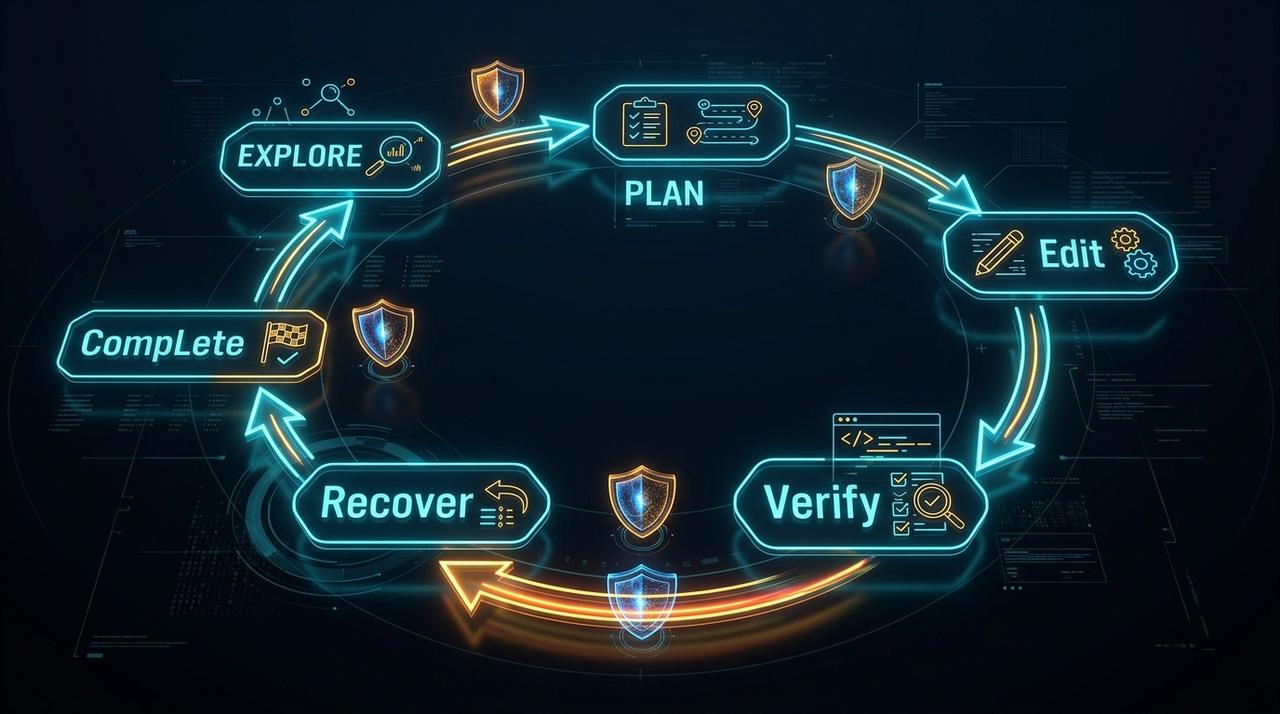
Smoke Monkey Harness is composed of four transparent parts. The state machine runs a bounded Explore → Plan → Edit → Verify → Recover loop with anti-loop protections. The tool set ships 24 native developer tools — file discovery, AST chunk editing, shell execution, git, and tests. The context manager compacts long sessions to control token spend via context compaction. And the safety layer enforces permissions and human gates before anything destructive runs. Because all of it is TypeScript you can read, "open source" here means genuinely forkable.
Running the Harness Locally and Exposing It Over MCP
A local-first harness keeps your code on your hardware and your bill at zero. Point Smoke Monkey at a local Ollama model and it performs file edits, runs your tests, and inspects git with no network calls. When you do want an external interface, start the built-in MCP server so Claude Code, Cursor, or Windsurf can call your harness tools under your own permission rules — see the MCP vs custom tools trade-off for when that is worth it.
import { createAgent, createMcpServer } from 'smoke-monkey-harness';const agent = createAgent({provider: 'ollama',model: 'qwen3:14b',workspacePath: process.cwd(),});// Expose the local harness to external agents over stdio MCPcreateMcpServer({ agent, transport: 'stdio' });
Frequently Asked Questions
Q:What is a coding agent harness?
A harness is the runtime around a model: the agent loop, the tool layer, context management, and permissions. It determines whether an agent is autonomous, safe, and deterministic, independent of which model is plugged in.
Q:Is Smoke Monkey Harness really open source?
Yes. It is MIT licensed with zero runtime dependencies, so you can read, fork, modify, and ship it in commercial products without fees or restrictions.
Q:Can a harness run fully offline?
Yes. Paired with Ollama and an open-weights model like DeepSeek R1 or Qwen3, the harness executes file edits, shell commands, and tests with no network access at all.
Q:How is a harness different from an agent framework?
Frameworks usually focus on chaining LLM calls. A harness focuses on safe, deterministic tool execution against a real workspace — planning loops, AST edits, sandboxing, and human gates. Smoke Monkey Harness is a harness first.
Related Alternatives & Comparisons
Claude Code Runtime Alternative: Open Source Stdio MCP Agent Harness
Openai Codex Alternative Open Source: Free Open Source AI Agent & Runtime (2026)
Open Source Devin Alternative: Build Autonomous Software Engineers in TypeScript
SmolAgents Alternative: TypeScript Agent Runtime with 24 Native Dev Tools
Related Architecture Guides
View all guidesBest Open Source Coding Agents in 2026: Free, Local & Fully Hackable Harnesses
MCP Server Security Best Practices: Hardening Model Context Protocol Agents in 2026
Claude Agent Skills Best Practices: Writing SKILL.md Files That Actually Work
Build with Smoke Monkey Harness
Zero dependencies. 24 built-in tools. Human-in-the-loop safety. 100% open source under the MIT License.