
MCP Server Security Best Practices: Hardening Model Context Protocol Agents in 2026
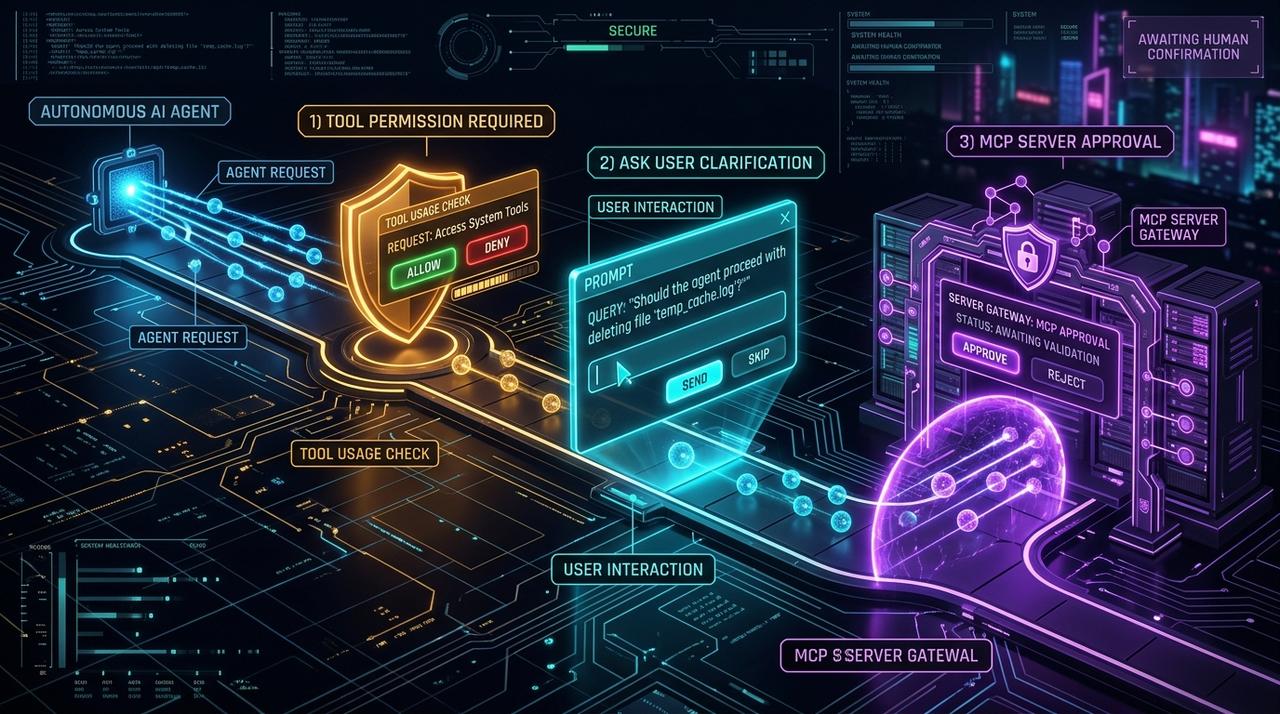
Giving an LLM a tool is giving it a capability — and every capability is an attack surface. MCP servers expose files, shells, databases, and APIs to autonomous agents, which makes **MCP server security** the single highest-leverage hardening task in an agent deployment. This guide walks through the threat model, the OWASP-style risk categories, and concrete mitigations you can implement in TypeScript today.
MCP Server Security Best Practices: Hardening Model Context Protocol Agents in 2026: Giving an LLM a tool is giving it a capability — and every capability is an attack surface. MCP servers expose files, shells, databases, and APIs to autonomous agents, which makes **MCP server security** the single highest-leverage hardening task in an agent deployment. This guide walks through the threat model, the OWASP-style risk categories, and concrete mitigations you can implement in TypeScript today. Designed as a zero-dependency, open-source TypeScript architecture under the MIT License with native Model Context Protocol (MCP) support and deterministic phase state machines.
- The core MCP threats: tool poisoning, prompt injection through tool output, confused deputy, and over-broad scopes.
- Least privilege everywhere: scoped tokens, sandboxed execution, and explicit per-tool allow/deny rules.
- Human-in-the-loop gates for destructive tools (shell, write, git push, network egress).
- Supply-chain hygiene: pin server versions, vet third-party MCP servers, and log every tool invocation.
import { createAgent, createMcpServer } from 'smoke-monkey-harness';// 1. Least-privilege agent: deny by default, ask on destructive toolsconst agent = createAgent({provider: 'anthropic',model: 'claude-3-7-sonnet',workspacePath: process.cwd(),permissions: {read_file: 'allow',write_file: 'ask',run_command: 'ask', // human-in-the-loop gatenetwork: 'deny', // no unexpected egress},});// 2. Expose only the tools you intend to share over MCPcreateMcpServer({agent,allowTools: ['read_file', 'list_dir', 'run_tests'],auditLog: './mcp-audit.log',});
Watch: Related Video Guides
Anthropic Just Built an Agentic OS — Open Source Harness Breakdown
Smoke Monkey
MCP Server Security — Hardening Your Server
TutorialEdge
The MCP Threat Model: Why Tools Are the New Attack Surface
Model Context Protocol turns a passive model into an actor with real capabilities. That is exactly where risk concentrates. The four highest-impact MCP threats in 2026 are: tool poisoning (a malicious or compromised server describes a tool in a way that tricks the model into misuse), prompt injection via tool output (a file, webpage, or query result contains instructions that hijack the agent), confused deputy (a trusted agent is tricked into wielding its privilege on behalf of untrusted input), and over-broad scopes (a token or role grants far more access than the task requires). Every MCP hardening decision traces back to one of these four.
Treat All Tool Output as Untrusted Input
Anything an MCP tool returns — file contents, HTTP responses, database rows — can contain adversarial instructions. Never let tool output silently expand the agent's permissions or skip a confirmation step.
Best Practice 1: Least Privilege and Explicit Scopes
Start from deny-by-default and grant the smallest capability that completes the task. Give each MCP server its own scoped credentials rather than reusing a broad admin token. Separate read, write, and execute into distinct permissions. In Smoke Monkey Harness, permissions are declared per tool (read_file, write_file, run_command, network) and evaluated on every call, so a compromised prompt cannot silently elevate a read-only session into a write-capable one.
const agent = createAgent({provider: 'openai',model: 'gpt-5',workspacePath: process.cwd(),permissions: {read_file: 'allow',write_file: 'ask',run_command: 'ask',network: 'deny',},allowedPaths: ['./src', './tests'], // cannot touch the rest of disk});
Best Practice 2: Sandbox Destructive Tools and Enforce Human Gates
Shell execution, filesystem writes, and network calls are where damage happens. Sandbox these tools and require an explicit human approval before they run. Smoke Monkey Harness implements this with the three pauses — ask_permission, ask_question, and notify_user — so a command like rm -rf or a git push --force cannot proceed without a decision from a person. Combine the gate with a bounded loop to prevent runaway agents from retrying a dangerous action indefinitely.
Best Practice 3: Supply-Chain Hygiene and Auditing
Third-party MCP servers are dependencies, and dependencies get compromised. Pin server versions, review the source of any server you install, and prefer servers that declare a minimal tool surface. Two more controls pay off immediately: (1) validate tool metadata before it reaches the model, rejecting tools whose descriptions contain instruction-like content, and (2) log every invocation with the arguments and result so you can reconstruct an incident. A searchable audit log is the difference between a contained event and an unbounded breach. For agent-level isolation, pair MCP with the MCP-vs-custom-tools decision and context-managed memory that never persists untrusted instructions.
Frequently Asked Questions
Q:What are the biggest MCP server security risks?
Tool poisoning, prompt injection through tool output, the confused-deputy problem, and over-broad scopes. OWASP-style guidance groups these under insecure tool design, insufficient authorization, and inadequate logging.
Q:How do I prevent prompt injection through MCP tools?
Treat all tool output as untrusted data, never as instructions. Keep the system prompt authoritative, validate tool metadata before exposing it to the model, and require human approval for any tool that changes state.
Q:Should MCP servers run with GCP/AWS admin credentials?
No. Always use least-privilege, task-scoped credentials. Give each MCP server its own identity and the minimum permissions it needs, and rotate tokens regularly.
Q:Does Smoke Monkey Harness secure the tools it exposes over MCP?
Yes. Smoke Monkey enforces per-tool permissions, path allow-lists, network deny-by-default, human-in-the-loop pauses for destructive actions, and an optional audit log for every MCP tool invocation.
Related Alternatives & Comparisons
Claude Code Runtime Alternative: Open Source Stdio MCP Agent Harness
LangChain TypeScript Alternative: Zero Dependencies & Deterministic Loops
Google Agent Development Kit (ADK) Alternative: Multi-Model Open Source Harness
Related Architecture Guides
View all guidesBest Open Source Coding Agents in 2026: Free, Local & Fully Hackable Harnesses
Open Source Coding Agent Harness: Build a Forkable, Local AI Engineering Runtime
Claude Agent Skills Best Practices: Writing SKILL.md Files That Actually Work
Build with Smoke Monkey Harness
Zero dependencies. 24 built-in tools. Human-in-the-loop safety. 100% open source under the MIT License.