Multi-Agent Swarm Canvas: Orchestrate AI Agent Swarms Visually
A single agent is one context window and one tool loop. A **multi-agent swarm** splits the work across specialized workers — explorer, editor, verifier — each with its own context and permissions. This guide shows how to orchestrate swarms programmatically with Smoke Monkey Harness and visually on the infinite spatial canvas of **Smoke Monkey Canvas**.
Multi-Agent Swarm Canvas: Orchestrate AI Agent Swarms Visually: A single agent is one context window and one tool loop. A **multi-agent swarm** splits the work across specialized workers — explorer, editor, verifier — each with its own context and permissions. This guide shows how to orchestrate swarms programmatically with Smoke Monkey Harness and visually on the infinite spatial canvas of **Smoke Monkey Canvas**. Designed as a zero-dependency, open-source TypeScript architecture under the MIT License with native Model Context Protocol (MCP) support and deterministic phase state machines.
- Swarms win on width: split wide, parallelizable, or risk-sensitive tasks across isolated contexts.
- Smoke Monkey Canvas is a visual spatial multi-agent OS — drag-and-drop agents on an infinite canvas and watch them work.
- The reliable topology is supervisor + workers: one planner, many scoped executors with typed handoffs.
- Every agent on the canvas inherits the 6-phase state machine, 24 built-in tools, and human-in-the-loop pauses.
import { createAgent } from 'smoke-monkey-harness';// Supervisor decomposes the task, workers execute in parallelconst supervisor = createAgent({provider: 'anthropic',model: 'claude-opus-5',workspacePath: process.cwd(),});const plan = await supervisor.run('Split this refactor into independent tasks. Output JSON.');// Each worker runs in its own session and context windowconst workers = JSON.parse(plan.output).tasks.map((task) =>createAgent({provider: 'anthropic',model: 'claude-sonnet-5',workspacePath: process.cwd(),permissions: { run_command: 'ask', write_file: 'ask' },}).run(task.instruction));const results = await Promise.all(workers);// Prefer a visual workspace? Launch Smoke Monkey Canvas:// npx @smoke-monkey/canvas start
Watch: Related Video Guides
Anthropic Just Built an Agentic OS — Open Source Harness Breakdown
Smoke Monkey
Agentic AI Frameworks Explained: Workflows, Multi-Agent, & Production
IBM Technology
Why Multi-Agent Swarms Beat a Single Agent
A single agent is one context window and one tool loop. That works until a task spans many modules, services, or research threads. A multi-agent swarm splits the work across specialized workers — an explorer to map the codebase, an editor to change it, a verifier to test it — each with its own context and permissions. No single window has to hold everything, so quality and latency both improve. In classic multi-agent orchestration a supervisor decomposes the goal and workers execute in parallel, all coordinated by a deterministic runtime rather than freeform chatter.
Swarms are about context isolation, not vibes
The win is isolation: each worker gets a clean context window and a narrow tool set. That is what makes large tasks tractable and keeps a runaway explorer from derailing the whole job.
Smoke Monkey Canvas: An Infinite Spatial Workspace
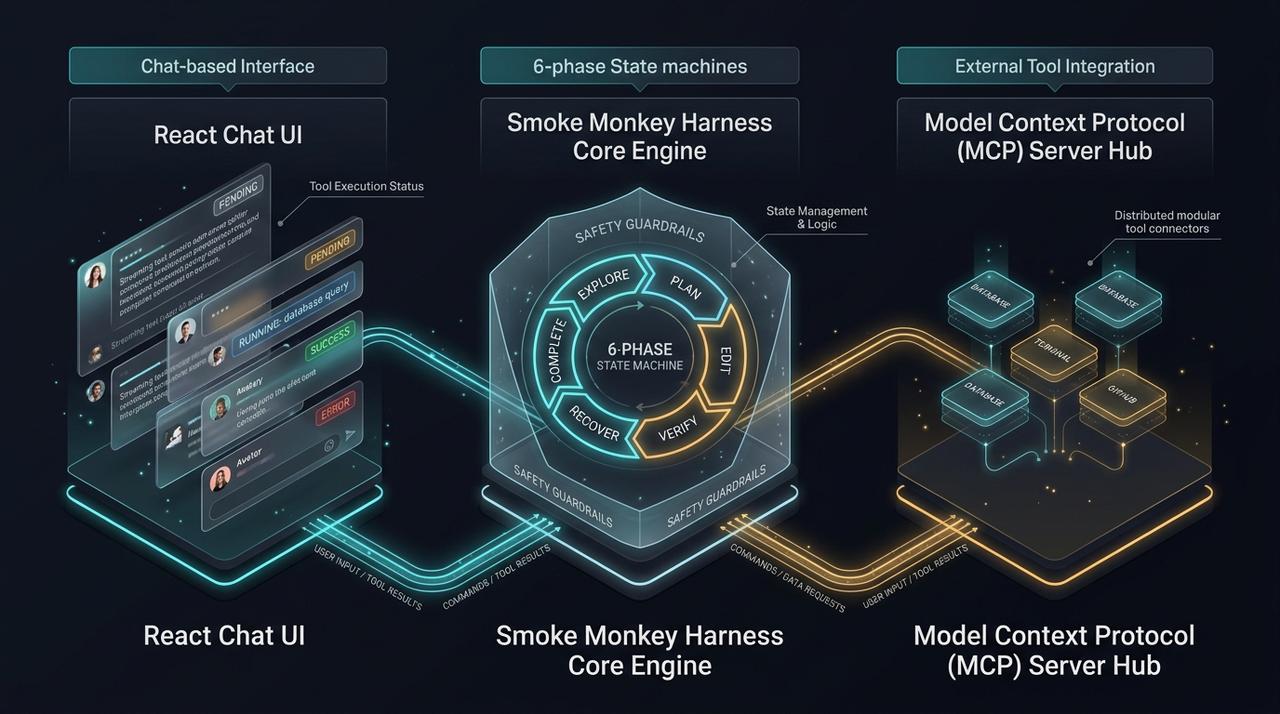
Smoke Monkey Canvas turns a swarm into something you can see and steer. It is a visual spatial multi-agent OS: an infinite 2D canvas where each agent is a card you can drag, zoom, connect, and inspect. Launch it in seconds with npx @smoke-monkey/canvas start — no config, no account, no cloud lock-in. Because Canvas is built directly on top of Smoke Monkey Harness, every agent on the canvas inherits the same 6-phase state machine (explore → plan → edit → verify → recover → complete), the same 24 built-in tools, and the same human-in-the-loop pauses. Instead of reading interleaved terminal logs, you watch agents work side by side on one infinite canvas.
# Launch the visual spatial multi-agent OSnpx @smoke-monkey/canvas start
Supervisor and Worker Patterns on the Canvas
The most reliable swarm shape is supervisor + workers. The supervisor reads the repository, emits a typed task plan, and spawns one worker per task; an orchestrator aggregates their structured outputs and the supervisor synthesizes a final answer. On the Canvas this topology is drawn literally: drop a supervisor card, wire it to worker cards, and watch results flow back along the edges. Under the hood it is the ordinary TypeScript API — Canvas is an observability and control surface over the same runtime.
import { createAgent } from 'smoke-monkey-harness';const supervisor = createAgent({ provider: 'anthropic', model: 'claude-opus-5', workspacePath: process.cwd() });const plan = await supervisor.run('Decompose the migration into independent tasks. Output JSON.');const tasks = JSON.parse(plan.output).tasks;const results = await Promise.all(tasks.map((t) =>createAgent({provider: 'anthropic',model: 'claude-sonnet-5',workspacePath: process.cwd(),permissions: { run_command: 'ask', write_file: 'ask' },}).run(t.instruction)));const report = await supervisor.run('Synthesize these worker results:\n' + JSON.stringify(results));console.log(report.output);
When a Swarm Beats a Single Agent
Use a swarm when the task is wide (many files, services, or sources), parallelizable (subtasks do not touch the same files), or risk-sensitive (a verifier agent should check the editor). Stay single-agent when the task is small, sequential, or shares one tight context. A good rule: if a human would hand it to a team, use a swarm; if a human would do it in one sitting, keep it single. To keep large swarms safe, gate destructive tools with permission pauses, give workers isolated subcontexts, and bound retries with the state machine.
Frequently Asked Questions
Q:What is a multi-agent swarm?
A multi-agent swarm is several autonomous agents working the same goal in parallel, each with its own context window and tool scope. A supervisor typically decomposes the task, workers execute subtasks, and the runtime aggregates the results.
Q:Is Smoke Monkey Canvas free and open source?
Yes. Canvas is 100% open source under the MIT license and built directly on Smoke Monkey Harness. There are no seat fees, no accounts, and no mandatory telemetry.
Q:How do I launch Smoke Monkey Canvas?
Run `npx @smoke-monkey/canvas start` for a zero-install launch in your browser. You can also install it globally or run the official Docker image if you prefer a persistent daemon or container.
Q:Can agents in a swarm share memory?
Yes, through subcontexts and the shared workspace. Each worker keeps an isolated context, then returns a synthesized result to the supervisor, which prevents context pollution across the swarm.
Related Alternatives & Comparisons
Related Architecture Guides
View all guidesBest Open Source Coding Agents in 2026: Free, Local & Fully Hackable Harnesses
MCP Server Security Best Practices: Hardening Model Context Protocol Agents in 2026
Open Source Coding Agent Harness: Build a Forkable, Local AI Engineering Runtime
Build with Smoke Monkey Harness
Zero dependencies. 24 built-in tools. Human-in-the-loop safety. 100% open source under the MIT License.