Parallel Agent Orchestration: Run a Fleet of Coders on a Single Mac
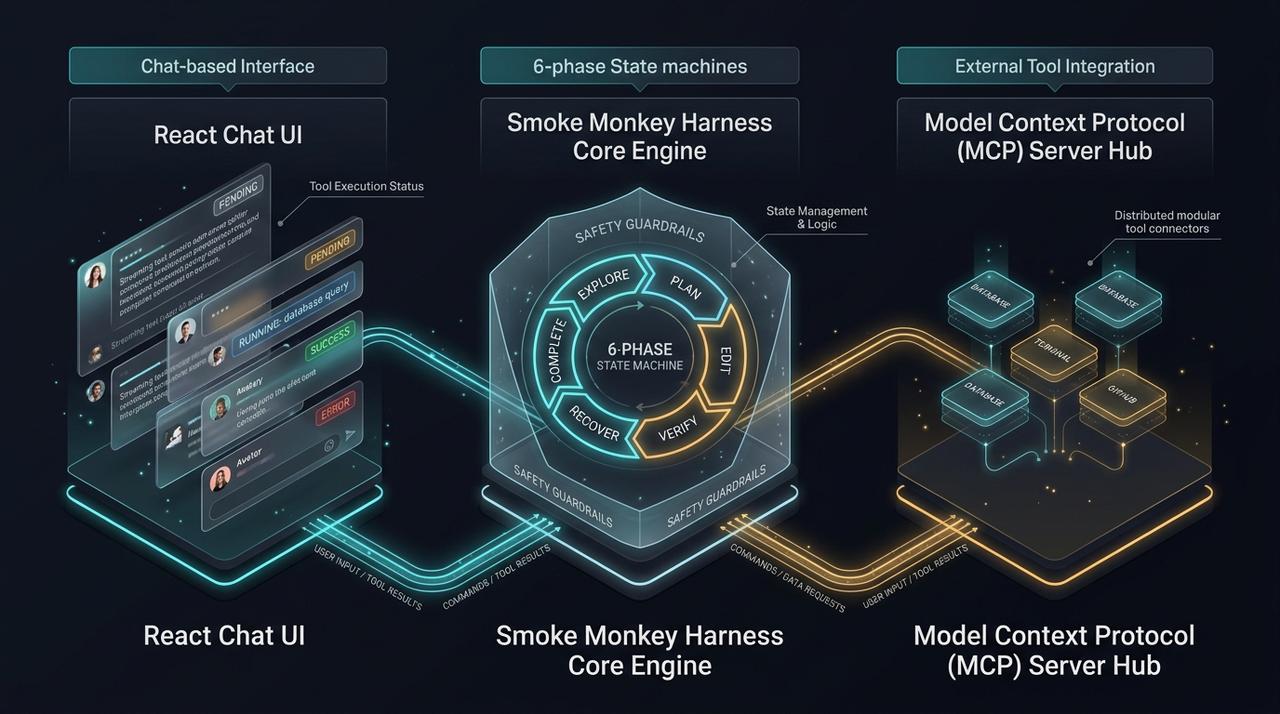
The 2026 shift is from one coding agent to a **fleet**: tools like Orca, OpenRig, and Brigade run many agents in parallel on local hardware, each in its own git worktree. Parallelism cuts wall-clock time dramatically, but only if the tasks are isolated and the results are reconciled. This guide shows how [Smoke Monkey Harness](/solutions/what-is-an-ai-agent-harness) runs a parallel fleet with isolated workspaces, and how **Smoke Monkey Canvas** turns that fleet into a visual board you can steer.
Parallel Agent Orchestration: Run a Fleet of Coders on a Single Mac: The 2026 shift is from one coding agent to a **fleet**: tools like Orca, OpenRig, and Brigade run many agents in parallel on local hardware, each in its own git worktree. Parallelism cuts wall-clock time dramatically, but only if the tasks are isolated and the results are reconciled. This guide shows how [Smoke Monkey Harness](/solutions/what-is-an-ai-agent-harness) runs a parallel fleet with isolated workspaces, and how **Smoke Monkey Canvas** turns that fleet into a visual board you can steer. Designed as a zero-dependency, open-source TypeScript architecture under the MIT License with native Model Context Protocol (MCP) support and deterministic phase state machines.
- Parallel agents trade context isolation for speed: each worker needs its own worktree and context window.
- Reconciliation is the hard part — a supervisor must merge independent results without conflicts.
- Smoke Monkey Harness runs N agents concurrently with per-agent permissions and bounded retries.
- Smoke Monkey Canvas visualizes the whole fleet on an infinite canvas so you can spot a stuck worker instantly.
import { createAgent } from 'smoke-monkey-harness';// One fleet, many isolated workers on a single machineconst tasks = ['auth', 'billing', 'search', 'docs'];const fleet = tasks.map((name) =>createAgent({provider: 'ollama',model: 'qwen3:8b',workspacePath: `.worktrees/${name}`, // isolated git worktreepermissions: { write_file: 'ask', run_command: 'ask' },maxIterations: 25,}).run(`Implement the ${name} module and run its tests`));const results = await Promise.all(fleet);console.log(results.map((r) => r.status));// Watch the fleet on the canvas: npx @smoke-monkey/canvas start
Watch: Related Video Guides
Anthropic Just Built an Agentic OS — Open Source Harness Breakdown
Smoke Monkey
Parallel Agent Orchestration with Orca: Local AI Mac
Joe Maddalone
Why Parallel Agents Won 2026
A single agent is serial: it reads, edits, tests, and recovers one step at a time. When a job decomposes into independent modules, running four agents in parallel can cut wall-clock time by most of the difference — and with fast local models it all fits on one Mac. The 2026 tooling wave (Orca, OpenRig, Brigade) made this mainstream by pairing git worktrees with local agent runners, so each agent edits its own checkout and never stomps another's files. The idea is simple; the coordination is not. That is the layer Smoke Monkey Harness supplies, with Smoke Monkey Canvas as the visual fleet console.
Isolation: Worktrees and Context
Parallelism fails when agents share state. Two agents editing index.ts, or both writing to the same ports and temp files, produce conflicts and flaky results. The fix is isolation on two axes: filesystem and context. Give each worker its own git worktree so edits cannot collide, and its own context window so one task's tool output does not pollute another. Smoke Monkey Harness supports both — workspacePath scopes the worktree and each agent gets a fresh subcontext. For the git side specifically, see AI agent git workflows and multi-agent orchestration.
Reconciliation: Merging the Fleet
After the parallel run you have N branches and N results, and the supervisor must reconcile them. That means a typed task plan up front, structured outputs from each worker, and a merge step that resolves conflicts — ideally on small, non-overlapping files and with an automated test gate. Smoke Monkey gives each worker a scoped permission set and bounded retries so a stuck agent cannot block the fleet, and the verification loop proves the merged result before you trust it. Smoke Monkey Canvas shows the reconciliation stage on the board as workers complete and the supervisor gathers their outputs.
import { createAgent } from 'smoke-monkey-harness';const supervisor = createAgent({ provider: 'anthropic', model: 'claude-opus-5', workspacePath: process.cwd() });const plan = await supervisor.run('Split the migration into non-overlapping tasks. Output JSON.');const tasks = JSON.parse(plan.output).tasks;const outputs = await Promise.all(tasks.map((t) =>createAgent({provider: 'ollama',model: 'qwen3:8b',workspacePath: `.worktrees/${t.id}`,permissions: { write_file: 'ask', run_command: 'ask' },}).run(t.instruction)));const merged = await supervisor.run('Reconcile these worker diffs and report conflicts:\' + JSON.stringify(outputs));console.log(merged.output);
Steering the Fleet on the Canvas
A fleet is hard to follow in interleaved logs. Smoke Monkey Canvas (npx @smoke-monkey/canvas start) lays every worker out as a card on an infinite board, connected to the supervisor, with live status, token spend, and streaming tool calls. When one agent stalls on a failing test you see it instantly and can pause it while the others run. Across 300+ MCP tools and many agents, the canvas is the difference between running a fleet and managing one.
// Terminal 1: the visual fleet console// npx @smoke-monkey/canvas start// Terminal 2: each worker registers over MCP and appears as a cardimport { createAgent } from 'smoke-monkey-harness';const workers = ['auth', 'billing', 'search'].map((name) =>createAgent({provider: 'ollama',model: 'qwen3:8b',workspacePath: `.worktrees/${name}`,mcp: { expose: true },}));await Promise.all(workers.map((w) => w.serve()));
Frequently Asked Questions
Q:Can I really run multiple coding agents on one Mac?
Yes. With local models and git worktrees, a single machine comfortably runs several agents concurrently. Smoke Monkey Harness manages their isolation, permissions, and iteration limits.
Q:How do parallel agents avoid conflicting edits?
Each worker gets its own git worktree and context window, so files and context never collide. A supervisor then reconciles structured outputs and merges non-overlapping changes.
Q:What is the best parallel-agent setup?
One supervisor that emits a typed task plan, N workers in isolated worktrees, and an automated test gate on the merge. Smoke Monkey Harness and Canvas implement exactly this shape.
Q:How does Smoke Monkey Canvas help orchestration?
It renders the fleet as draggable cards on one canvas with live status and per-agent controls, so you can spot a stalled worker and pause it without reading raw logs.
Related Alternatives & Comparisons
Related Architecture Guides
View all guidesBest Open Source Coding Agents in 2026: Free, Local & Fully Hackable Harnesses
MCP Server Security Best Practices: Hardening Model Context Protocol Agents in 2026
Open Source Coding Agent Harness: Build a Forkable, Local AI Engineering Runtime
Build with Smoke Monkey Harness
Zero dependencies. 24 built-in tools. Human-in-the-loop safety. 100% open source under the MIT License.